
Introduction
PID tuning is simultaneously the most feared and most rewarding aspect of FPV drone setup. A well-tuned quad feels like it’s reading your mind — it responds instantly, holds its line perfectly, and recovers from maneuvers without oscillation. A poorly tuned quad fights you constantly, wobbles through turns, and can even shake itself apart. This guide will demystify PID tuning for beginners.
What Are PIDs?
PID stands for Proportional, Integral, and Derivative — three mathematical terms that work together to control how your quadcopter responds to inputs and disturbances.
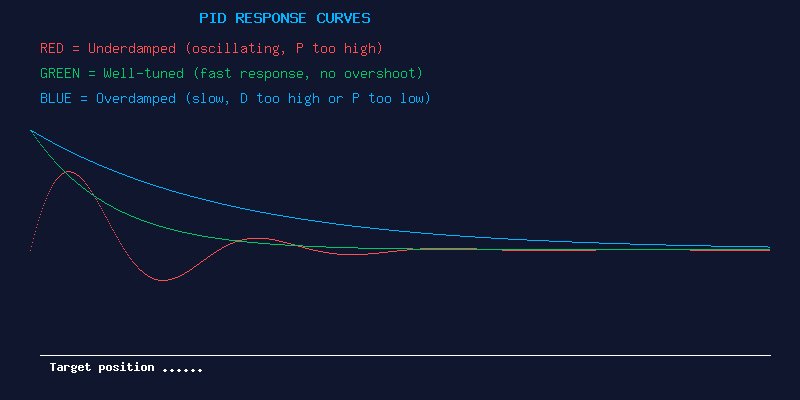
P (Proportional): The main “push” that corrects errors. If your quad tilts 5 degrees off target, P gain tells the motors how hard to push to correct that error. Higher P gives snappier response but can cause oscillation if too high. Think of P as the “immediate reaction” component.
I (Integral): The “memory” term that accumulates error over time. If P can’t quite hold the exact angle (due to wind, CG offset, or other steady forces), I gain builds up and provides the extra push needed. Higher I holds position better but can cause slow oscillation or “I-term windup” on sharp maneuvers.
D (Derivative): The “damping” term that predicts future error by looking at how fast the error is changing. D acts like a shock absorber — it resists sudden changes and smooths out the P response. Higher D reduces bounce-back after sharp moves but can introduce motor heat and amplify noise if too high.
Understanding the Tuning Process
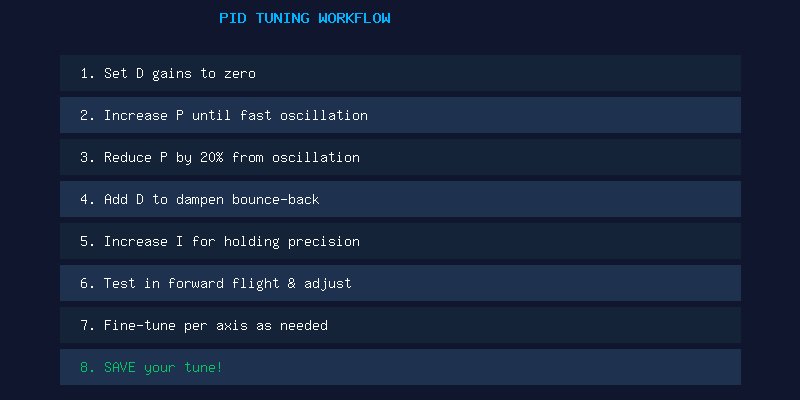
Tuning is essentially a process of pushing each gain until you see problems, then backing off. Here’s the step-by-step workflow:
Step 1: Start Conservative
Begin with default Betaflight PIDs or the UAV Tech preset for your build type. If you’re on Betaflight 4.4+, the default tune is remarkably good and may only need minor adjustments. Don’t start from zero — you’ll just make more work for yourself.
Step 2: Tune P First
With D set low (or even zero on Roll/Pitch), gradually increase P gain while doing punch-outs and sharp turns. Listen and watch for fast oscillation — a “chirping” sound or visible high-speed wobble. When you find the oscillation point, reduce P by 15-20%. That’s your P ceiling.
Step 3: Add D for Damping
After setting P, add D gain to eliminate bounce-back at the end of flips and rolls. Too little D: the quad overshoots and wobbles after hard stops. Too much D: motors run hot, and you’ll hear a “grinding” sound from the motors.
Step 4: Set I for Holding
I gain is the easiest to tune. Increase until the quad holds angle perfectly during fast forward flight and doesn’t drift in wind. If you see slow oscillation (1-2 Hz waggle), your I is too high.
Common Tuning Symptoms
- Fast oscillation / chirping: P too high on that axis. Reduce P by 10% and retest.
- Bounce-back after flips/rolls: D too low. Increase D gain until the quad returns smoothly without overshoot.
- Slow wobble during forward flight: I too high, usually on pitch. Reduce I gain.
- Hot motors after gentle flight: D too high. The motors are working against the D term constantly. Reduce D and check motor temps.
- Propwash oscillation: The quad wobbles when descending through its own turbulent air. Increase D slightly and ensure your P isn’t too high. Some propwash is normal even on well-tuned quads.
- Drift in wind: I too low. The quad can’t hold its angle against steady wind force.
Axis-Specific Tuning
Roll: Usually the easiest axis. The quad has low rotational inertia on roll, so gains can be higher. Tune this first.
Pitch: Often needs lower P than roll because the quad has more mass to rotate. Pitch D is critical for smooth forward flight without bounce.
Yaw: Tune last. Yaw P should be high enough to give crisp turns but not so high that it overshoots. Yaw D is typically very low or zero — the quad has significant rotational inertia on yaw.
Filters: The Hidden Tuning Variable
Modern Betaflight’s dynamic filtering does an incredible job of removing motor noise automatically. However, filter settings interact with your PIDs. Less filtering = more noise gets through, which limits how high you can push D gain. More filtering = cleaner signal but more delay, which limits P gain.
For most pilots, leaving filters at Betaflight defaults (with RPM filtering enabled) is the right call. Only adjust filters if you’re chasing the last 5% of performance and understand the tradeoffs.
Recommended Starting Points
For a typical 5-inch freestyle build on Betaflight 4.5+:
- Roll: P=45, I=90, D=35
- Pitch: P=50, I=95, D=38
- Yaw: P=45, I=90, D=0
These are starting values — tune from here based on flight testing. Every build is different.
Conclusion
PID tuning isn’t black magic — it’s a methodical process of observation and adjustment. Start with a known-good preset, tune one axis at a time, and always test-fly your changes before making more adjustments. Use blackbox logging to analyze what’s happening in flight if you’re chasing difficult issues. Remember: a “good enough” tune that flies smoothly is far better than chasing perfection and never actually flying.