
Getting your Betaflight tune dialed in is the single biggest performance upgrade you can make to your FPV drone — and it costs nothing but time. Betaflight 4.6 brings refined PID controllers, dynamic notch filtering, and improved RPM filter integration that make tuning more forgiving than ever. Whether you are chasing buttery-smooth HD footage or razor-sharp race response, this guide walks you through every setting that matters.
Understanding the PID Loop
The PID controller is the brain of your flight controller. It reads gyro data at 8kHz, compares your commanded roll/pitch/yaw against actual movement, and adjusts motor outputs thousands of times per second. The four terms — Proportional (P), Integral (I), Derivative (D), and Feedforward (FF) — each handle a different aspect of flight correction.
P (Proportional) reacts to the present error — how far the quad is from where you want it to be. Higher P gives sharper stick feel but introduces oscillation. I (Integral) corrects steady-state error over time, eliminating drift in wind. D (Derivative) dampens oscillations by reacting to how fast the error is changing. Too much D makes motors run hot; too little and your quad wobbles after flips. FF (Feedforward) predicts stick movement before error occurs, giving that locked-in feel without adding overshoot.
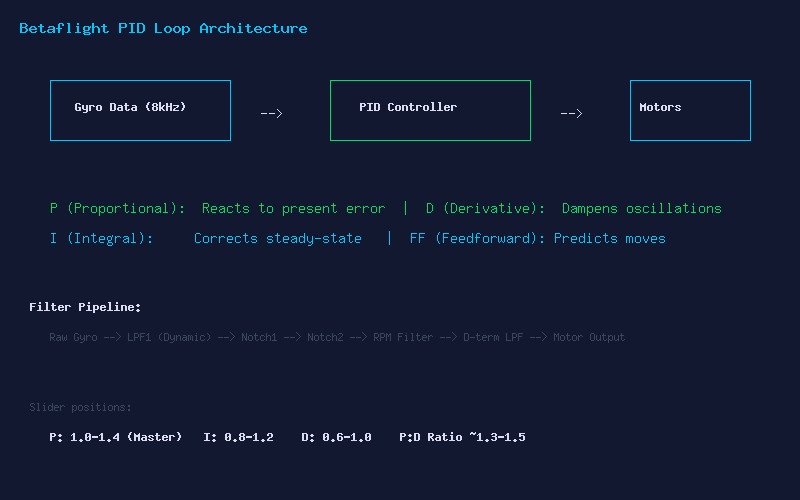
Betaflight 4.6 Filter Pipeline
Filters remove noise before it reaches the PID controller. The 4.6 pipeline starts with a dynamic low-pass filter on the gyro, followed by static notch filters for frame resonance, RPM-based notch filters that track motor speed, and finally a D-term low-pass. The key insight: less filtering = more responsive quad, but only if your build is mechanically clean.
Start with the default filter sliders at position 1.0 (center). Fly a pack, check motor temperatures. If motors are warm (>50°C), you have noise — move the gyro LPF slider left (more filtering). If motors are cold and the quad feels sluggish, move it right (less filtering). The RPM filter handles most motor noise, so you can often run lighter gyro filtering than in Betaflight 4.4 and earlier.
Step-by-Step Tuning Workflow
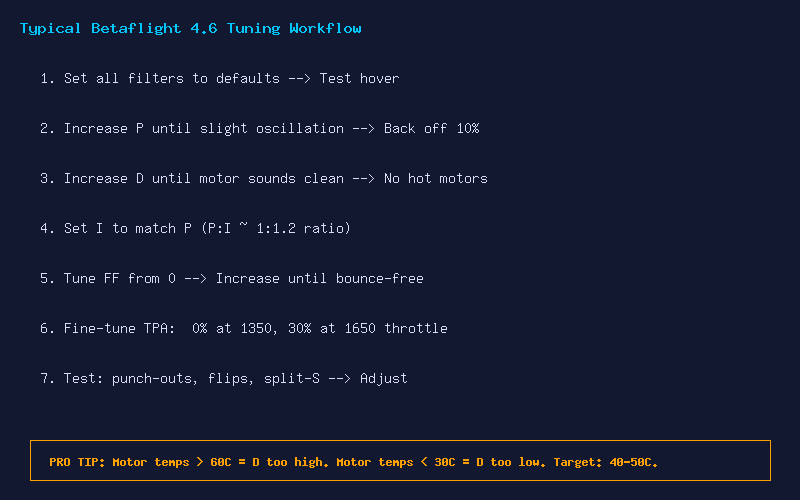
Here is the proven tuning sequence that works for 90% of builds:
- Set all filters to default (slider 1.0) — Test hover, check for obvious oscillation
- Increase P gain on pitch and roll until you see slight oscillation on punch-outs, then back off 10%
- Increase D gain until motor sounds clean and crisp during flips — check motor temps after 30 seconds of aggressive flying
- Set I gain to roughly match P (P:I ratio around 1:1.2 works well for most builds)
- Tune FF from zero — Increase until the quad feels responsive without bounce-back after sharp stick inputs
- Configure TPA (Throttle PID Attenuation): Start at 1350 throttle, 30% at 1650, reducing P and D at high throttle to prevent oscillations under load
- Test everything: Full-throttle punch-outs, snap flips, split-S dives, and Matty flips
Motor Temperature: Your Best Tuning Friend
The fastest way to know if your tune is healthy: land immediately after a hard flight and touch the motor bells. If you cannot hold your finger on them for more than 3 seconds (>60°C), your D gain is too high or you are over-filtered and running excess P to compensate. Target 40-50°C after aggressive flying. Cold motors under 30°C suggest you are leaving performance on the table — D may be too low, or filters are too aggressive.
Profile Switching for Different Conditions
Betaflight supports up to 4 rate profiles. Set up Profile 1 for calm conditions with aggressive PIDs, Profile 2 for windy flying with higher I gain, and Profile 3 for cinematic flying with smoothed rates and extra filtering. Use the OSD profile indicator and a switch on your radio to change profiles mid-session.
Final Checklist
- P gain: Crisp response, no oscillation on punch-out
- D gain: Clean motor sound, 40-50°C after flight
- I gain: No drift in wind, holds angle in forward flight
- FF: No bounce-back, instant stick response
- Filters: Lightest possible without hot motors
- TPA: Smooth at high throttle, no grinding sound
A well-tuned quad transforms the flying experience. Take the time to learn what each slider does — your thumbs will thank you.