
ExpressLRS (ELRS) has become the dominant radio control link in the FPV hobby for good reason: it offers kilometer-scale range, sub-millisecond latency, and hardware that costs a fraction of legacy systems like Crossfire or TBS Tracer. But getting ELRS set up correctly – flashing firmware, configuring binding phrases, and tuning packet rates – can intimidate newcomers. This guide covers the complete setup process from unboxing to first flight.
What Is ExpressLRS?
ExpressLRS is an open-source radio control link that operates on 2.4GHz, 900MHz, or dual-band. It uses LoRa modulation for incredible range and low latency. Unlike traditional protocols, ELRS does not continuously transmit – it sends packets only when needed, which reduces interference and power consumption. The result is a link that can maintain control at ranges exceeding 30 kilometers with the right antenna setup, while still delivering 500Hz update rates for racing.
Hardware Selection
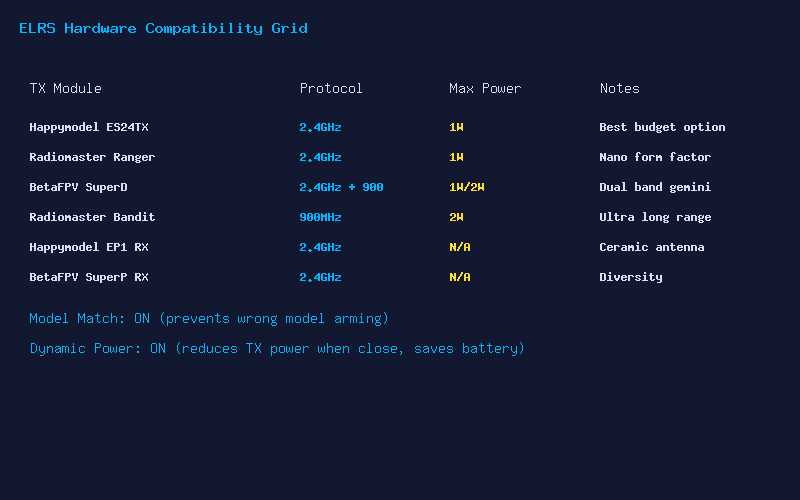
For most FPV pilots, 2.4GHz ELRS is the right choice. It offers antennas small enough for even micro quads, excellent penetration through trees and buildings, and enough range to outfly any video system. The Happymodel ES24TX transmitter module costs under $40 and delivers 1W of output power. Pair it with an EP1 or EP2 receiver (under $15) and you have a complete control link for the price of a single Crossfire receiver.
For extreme long-range pilots flying beyond 10km, 900MHz ELRS with a Radiomaster Bandit module provides deeper penetration and longer reach at the cost of larger antennas and slightly higher latency.
Flashing Firmware
Both the transmitter module and receiver ship with factory firmware, but you should flash the latest stable ELRS release before binding. Download the ExpressLRS Configurator from the ELRS GitHub releases page. Connect your TX module via USB, select the correct target (e.g., “Happymodel ES24TX 2400”), choose your regulatory domain (FCC 915MHz or CE 868MHz for 900MHz; ISM 2400 for 2.4GHz), and flash via UART.
Receivers flash over WiFi. Power-cycle the receiver three times rapidly (plug/unplug the battery), and it enters WiFi mode – you will see the “ExpressLRS RX” access point on your phone or laptop. Connect, open http://10.0.0.1 in a browser, and upload the firmware file you built in the Configurator.
Binding Phrase: The Killer Feature
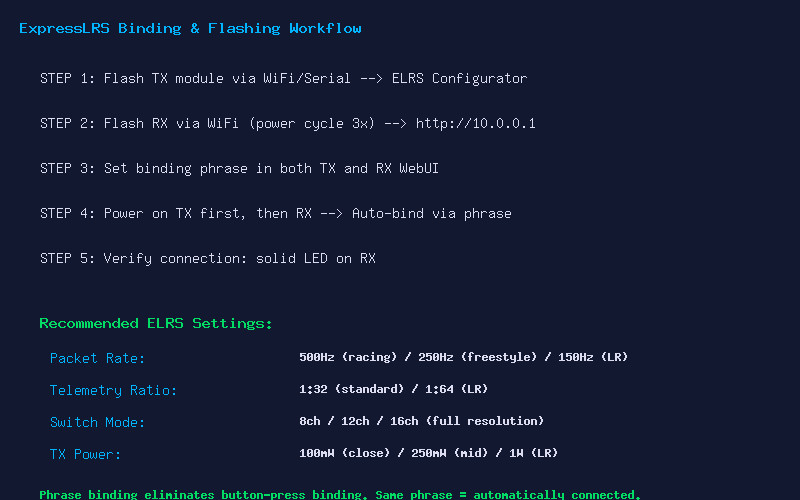
ELRS binding phrases eliminate the traditional bind-button dance. You set the same phrase (e.g., “mysecretlink123”) in both the TX module and all your receivers. When both are powered on, they automatically recognize each other and connect – no buttons, no binding plugs, no hassle. This means you can walk up to any ELRS-equipped quad with your radio and it just works, as long as the phrase matches.
Set the binding phrase during firmware flashing in the Configurator, or change it later through the WiFi WebUI on both the TX module and RX.
Packet Rates and Telemetry
ELRS offers packet rates from 25Hz to 1000Hz. For racing, 500Hz gives you nearly instantaneous stick response with 2ms latency. For freestyle, 250Hz is the sweet spot – still faster than any human can perceive, with better range and reliability. For long-range cruising, 150Hz or even 50Hz extends range dramatically. Set the telemetry ratio to 1:32 for standard use or 1:64 for long-range flights where you want maximum control link budget.
Dynamic power is another must-enable feature. It automatically reduces the TX module output power when the quad is close and ramps it up as RSSI drops, saving radio battery life and reducing 2.4GHz pollution at the flying field.
Betaflight Configuration
In Betaflight, set the receiver protocol to “CRSF” (Crossfire serial protocol – ELRS speaks the same language). Configure your arm switch, flight modes, and auxiliary channels as normal. Enable RSSI channel in the Receiver tab. Now go to the CLI and run “set expresslrs_telemetry = ON” and “save” – this enables two-way communication so your radio can display battery voltage, GPS coordinates, and link quality in real time.
Once you have experienced the rock-solid link and simplicity of ExpressLRS, there is no going back. It is simply the best control link available today.