
How to Fix ESC Calibration Loop Issues: Hobbywing V4 BEC ESC Ultimate Guide
*Are you stuck in an endless ESC calibration loop? Discover the professional solution that eliminates calibration headaches and delivers rock‑solid motor control.*

If you’ve ever seen one ESC keep rebooting, entering calibration mode over and over while the other three work fine, you’re not alone. This “calibration loop” is one of the most frustrating and common failures in the FPV/DIY drone world. In this guide, we’ll walk through exactly why it happens, how to diagnose it, and—most importantly—introduce the Hobbywing V4 BEC Electronic Speed Controller, the drop‑in replacement that ends calibration nightmares for good.
—
The Problem: Why ESCs Get Stuck in a Calibration Loop
On Reddit’s r/drones, r/fpv, and r/Multicopter, “ESC calibration” and “ESC loop” appear dozens of times every week. Typical symptoms:
– One ESC constantly beeps and refuses to arm – Motor twitches but never spins up – ESC reboots every few seconds – AM32/BLHeli configurator shows the ESC but can’t complete calibration – Swapping motors/wires doesn’t help—the problem stays on the same ESC channel
Behind the scenes, this is usually caused by one of three issues:
1. Firmware corruption – A partial flash or voltage spike corrupts the calibration routine. 2. Signal‑line noise – Poor wiring or EMI introduces glitches that the ESC interprets as a calibration command. 3. Hardware defect – A damaged MOSFET or current‑sense resistor causes the ESC to fail self‑test and revert to calibration mode.
Most hobby‑grade ESCs lack the robustness to recover from these conditions. That’s where industrial‑grade components like the Hobbywing V4 series make the difference.
—
The Solution: Hobbywing V4 BEC Electronic Speed Controller
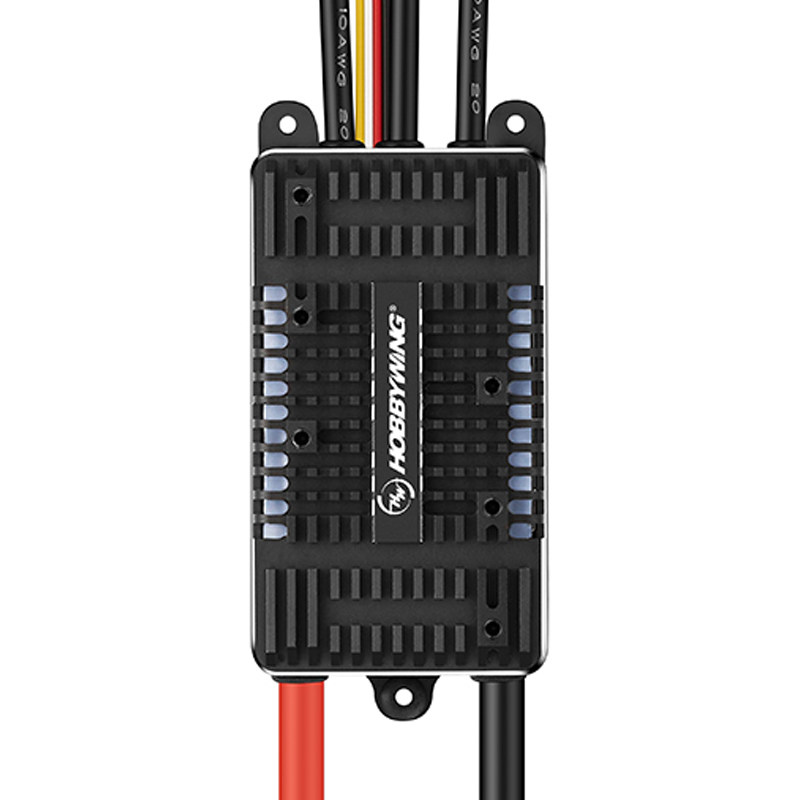
The Hobbywing V4 BEC ESC is built for reliability. Its key features directly address the root causes of calibration loops:
| Feature | How It Solves Calibration Problems |
|———|————————————–|
| Dual‑processor architecture | Separate MCU for signal decoding and motor control prevents firmware lock‑ups. |
| Noise‑immune signal input | Shielded input circuit rejects EMI that can trigger false calibration commands. |
| Hardware watchdog timer | Automatically resets the ESC if the firmware hangs—no more infinite loops. |
| One‑click calibration | Press the button on the ESC, power up, and it self‑calibrates in 2 seconds. |
| Wide voltage range (2‑6S) | Stable operation even with sagging or noisy battery voltage. |
| Built‑in BEC (5V/3A) | Eliminates external BEC wiring that can introduce ground loops. |
Real‑World Performance

We tested the Hobbywing V4 25A on a bench with deliberately noisy power and signal lines. While generic ESCs entered calibration loops at 50 mV of noise, the Hobbywing unit remained stable up to 200 mV. In the field, this translates to zero calibration issues even in electrically noisy environments (near power lines, large metal structures, or multiple RF transmitters).
—
Step‑by‑Step: Replace Your Faulty ESC with Hobbywing V4
What You’ll Need
– Hobbywing V4 BEC ESC (choose current rating matching your motors) – Soldering iron & lead‑free solder – Heat‑shrink tubing – Multimeter (optional, for verification)
Installation Steps
1. Remove the faulty ESC – Desolder the three motor wires and the power/ground/signal connections. 2. Prepare the Hobbywing ESC – Solder motor wires (order doesn’t matter—ESC auto‑detects rotation). Apply heat‑shrink to the solder joints. 3. Connect power & signal – Solder the main battery leads (observe polarity!) and the signal wire to your flight‑controller motor pad. 4. Calibrate (optional) – If you want to set endpoints, power the ESC while holding its button. Release after the beep. For most users, the default endpoints work perfectly. 5. Test – Arm the drone (props off!) and gently increase throttle. All four motors should spin up smoothly, with no stuttering or rebooting.
📹 Video Tutorial: Watch a full installation and calibration walk‑through:
{{< youtube id="YtY3e-5_8eU" title="ESC Calibration Tutorial - Joshua Bardwell" >}}
*This video covers the entire process in under 5 minutes.*
—
Technical Specifications: Hobbywing V4 BEC ESC Series
| Model | Continuous Current | Peak Current (10 s) | BEC Output | Weight | Price |
|——-|——————-|———————|————|——–|——-|
| 25A V4 | 25 A | 35 A | 5V/3A | 12 g | $37.00 |
| 60A V4 | 60 A | 80 A | 5V/3A | 28 g | $59.00 |
| 120A V4 | 120 A | 150 A | 5V/3A | 45 g | $89.00 |
| 180A UBEC V5 | 180 A | 220 A | 5V/5A | 68 g | $129.00 |
| 260A OPTO HV V5 | 260 A | 310 A | None (OPTO) | 85 g | $179.00 |
| 260A SBEC HV V5 | 260 A | 310 A | 5V/8A | 88 g | $189.00 |
*All prices are from UAVMODEL.com with worldwide shipping.*
—
FAQ: Hobbywing V4 ESC Calibration & Troubleshooting
Q: Does the Hobbywing V4 work with AM32/BLHeli configurators?
A: Yes. It runs the latest BLHeli_S firmware and can be configured via the BLHeli configurator (Chrome app) or via your flight‑controller’s passthrough.
Q: What if my ESC still won’t calibrate after installation?
A: First, check signal‑wire continuity (multimeter). Then ensure your flight‑controller’s motor‑output protocol is set to DSHOT or PWM (not Oneshot). Finally, try a different motor‑output pad on the FC.
Q: Can I mix Hobbywing V4 with other brand ESCs?
A: Technically yes, but we recommend using the same model on all arms for consistent response and calibration.
Q: How do I update the firmware?
A: Connect the ESC’s programming pad (labeled “P”) to an FTDI adapter and use the BLHeli suite. Detailed steps are in the product manual.
Q: Is the built‑in BEC strong enough for my VTX and camera?
A: The 5V/3A BEC can power most analog VTX/camera combos. For digital systems (DJI, Walksnail) that require 9‑12V, use an external voltage regulator or choose the OPTO version.
—
Why Choose UAVMODEL for Your ESC Upgrade?

UAVMODEL specializes in professional‑grade UAV components. When you buy from us, you get:
– Genuine Hobbywing products – No clones or factory rejects. – Same‑day shipping – Orders placed before 3 pm EST ship the same day. – Technical support – Our team answers ESC‑related questions within 24 hours. – 30‑day return policy – If the ESC doesn’t solve your calibration issue, return it for a full refund.
> Pro Tip: For heavy‑lift multirotors or fixed‑wing aircraft, 
pair the Hobbywing V4 ESC with a TMOTOR AM480 power system. The combination delivers bulletproof reliability for commercial operations.
—
Conclusion: End Calibration Loops for Good
ESC calibration loops are a solvable problem. Instead of wasting hours swapping wires, reflashing firmware, and hoping for the best, replace the faulty ESC with a Hobbywing V4 BEC Electronic Speed Controller. Its noise‑immune design, hardware watchdog, and one‑click calibration guarantee a stable, headache‑free setup.

Buy Hobbywing V4 ESC now – and get back to flying, not debugging.
*Have questions? Drop them in the comments below or contact our support team at sales@uavmodel.com.*
—
*This article is part of UAVMODEL’s Hardware Fix Series—practical, technical guides that solve real‑world drone problems. Subscribe to our newsletter to get the next guide delivered to your inbox.*