
Introduction
PID tuning transforms a sloppy, oscillating quad into a locked-in precision machine. While modern Betaflight defaults fly acceptably out of the box, every build benefits from targeted PID adjustments. This guide explains what each PID term does, how to diagnose common tuning issues, and provides a systematic workflow for achieving a perfect tune without a blackbox log.
What is a PID Controller?
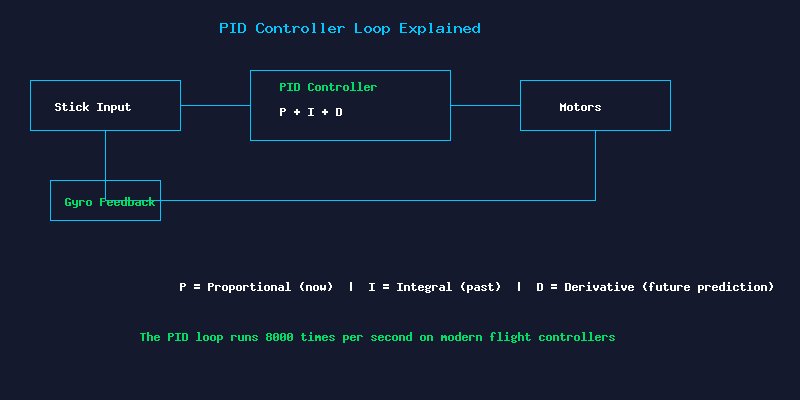
The PID (Proportional-Integral-Derivative) controller is the algorithm that keeps your quad stable and responsive. It runs 8,000 times per second on modern flight controllers, comparing your stick inputs against gyroscope data and adjusting motor speeds to minimize the error between commanded and actual rotation rates. The three terms work together:
- P (Proportional): Reacts to the current error. Higher P makes the quad more responsive but can cause oscillations if too high. Think of P as the “strength” or “springiness” of the correction.
- I (Integral): Corrects for accumulated past error. Higher I improves holding power against external forces like wind and propwash. Too much I causes slow oscillations and overshoot.
- D (Derivative): Predicts future error by measuring the rate of change. Higher D dampens oscillations and reduces bounce-back after sharp maneuvers. Too much D introduces motor heat and micro-oscillations that sound like grinding.
Pre-Tuning Setup
Before touching PIDs, ensure your hardware is sound. Update to Betaflight 4.5 or newer. Enable bidirectional DShot and RPM filtering for best results. Verify that all motors spin smoothly without binding and that the frame has no loose screws or delaminated arms. Set your rates first, as rate changes affect how the quad feels independently of PIDs. For most freestyle pilots, actual rates of 800-900 deg/sec on roll/pitch with 0.75 expo provide a smooth yet responsive feel.
Systematic Tuning Workflow
Step 1: Start with Defaults
Betaflight 4.5 defaults are surprisingly good. Set the PID profile slider to the preset matching your build (5-inch, 3-inch, whoop, etc.). Fly a full battery and note any issues before changing anything.
Step 2: Tune P (Proportional)
Increase P-gain on roll in increments of 5 until you hear or see fast oscillations during aggressive maneuvers, then back off by 3-5 points. Repeat for pitch and yaw. The quad should feel crisp and responsive without audible buzzing. Typical P values for a 5-inch freestyle build: 45-55 on roll/pitch, 90-100 on yaw.
Step 3: Tune D (Derivative)
D dampens the P-induced oscillations. After finding your maximum P, increase D until bounce-back after sharp stick inputs is eliminated. Watch for hot motors, which indicate excessive D. Fresh D values typically land between 30-40 for roll/pitch on 5-inch builds.
Step 4: Tune I (Integral)
I gain holds attitude against external forces. Fly aggressive split-S maneuvers and power loops. If the quad “slides out” or does not hold its line, increase I. If you notice slow oscillations during steady flight, I is too high. Do not exceed 60-70 on roll/pitch I for most builds.
Common Tuning Problems and Solutions
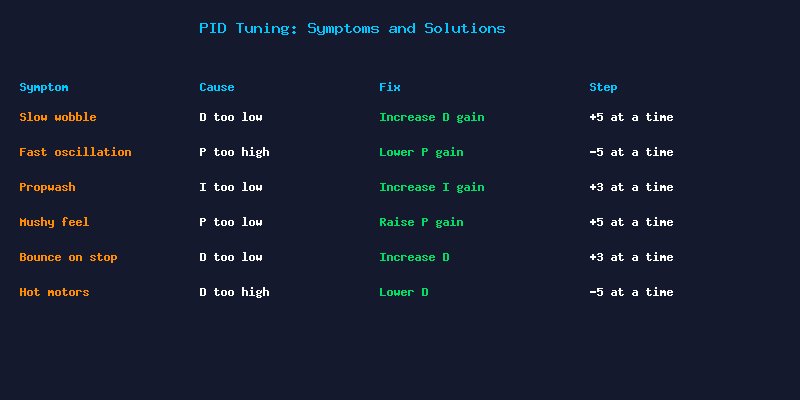
- Propwash oscillation (descending into own air): Increase I-gain and slightly increase D. Propwash is primarily an I-gain problem.
- Hot motors after tuning: D-gain is too high. Reduce D by 5 points on the affected axis. Motors should be comfortably warm, not hot enough to burn your finger.
- Slow, lazy feel: P-gain is too low. Increase P by 5 and re-test. Also check that your rates are not too conservative.
- Grinding or chirping sound: D-gain is too high, causing micro-oscillations at the motor level. Reduce D immediately and check motor temperature.
- Bounce-back after flips: Classic D-gain issue. Increase D on the affected axis in 3-point increments until the bounce is eliminated.
Advanced: TPA, Feedforward, and Filters
Once your base PIDs are solid, fine-tune these advanced parameters. TPA (Throttle PID Attenuation) reduces P and D at high throttle when aerodynamic forces naturally stabilize the quad, preventing high-throttle oscillations. Set TPA to start at 1300 throttle with 0.15-0.25 attenuation. Feedforward adds stick-feel sharpness without affecting stability. Increase feedforward for a more “connected” feel during fast stick movements. Filter sliders in Betaflight 4.5 have made filter tuning far less critical set the slider to 1.2-1.4 for most builds.
When to Use Blackbox Logs
For the final 5% of tuning perfection, blackbox logging is invaluable. The SpeedyBee F405 V4 and Matek H743 include onboard flash for recording flight data. Use the Plasmatree PID Analyzer or Betaflight Blackbox Explorer to visualize gyro vs setpoint tracking. Look for excessive D-term noise (indicates filter issues) and P-term overshoot (indicates P too high). A well-tuned quad shows the gyro line tracking the setpoint line cleanly with minimal overshoot and no high-frequency noise.
Conclusion
PID tuning is a skill that improves with practice. Start with Betaflight defaults, make small incremental changes (never more than one parameter at a time), and fly the same test maneuvers to evaluate each adjustment. Within 5-10 batteries of systematic tuning, you will have a quad that feels truly locked-in. The reward is a machine that responds to your inputs with precision and confidence, making every flight more enjoyable.